
How to Make Claude Write in Your Brand Voice: Projects, Skills or a Content System
Pasting your brand guidelines into Claude rarely produces on-brand copy. Here is why, and how Projects, Skills and a custom content system each fix a different part of the problem.
Wyatt Johnson
November 2, 2026
In short
- 01 Most brand guidelines describe a voice with adjectives. Claude writes better from examples, banned phrases and before-and-after rewrites.
- 02 A Claude Project is the fastest fix for one team writing in one voice. It keeps your instructions and reference files attached to every chat inside it.
- 03 A Skill packages your voice rules so they load automatically wherever your team uses Claude, and can include a script that checks drafts.
- 04 Once content goes out at volume, across channels or straight to a CMS, you need a system with review steps, not a better prompt.
Almost every marketing team has tried the same thing. Paste the brand guidelines PDF into Claude, ask for a LinkedIn post, and get something that is technically fine and sounds nothing like the brand.
The model is not ignoring your guidelines. The guidelines were written for people, and they leave out most of what a writer actually needs. This post covers why that happens, what to give Claude instead, and the three ways to set it up: a Project, a Skill, or a full content system.
Why pasting your brand guidelines doesn’t work
Open most brand books to the voice page and you will find something like “confident but approachable, expert without being academic, a little playful.” Every brand in your category says roughly the same thing.
A human writer gets away with this because they absorb the voice from years of reading the brand’s past work, sitting in meetings and getting edits from the CMO. Claude gets three adjectives. So it writes the average of every brand that has ever called itself confident and approachable.
Three other problems show up once you use Claude every day:
- Guidelines are mostly visual. A 40-page brand book might give voice one or two pages. The rest is logos, color and type, which makes the important part harder to find.
- Rules without reasons get applied badly. “Never say ‘cheap’” gets followed. “Avoid jargon” gets interpreted, and Claude’s idea of jargon may not match yours.
- Nobody re-pastes the PDF. The guidelines go into the first chat. The next forty chats, by five different people, start from nothing.
What Claude actually needs to match a voice
Before choosing a setup, rewrite your voice guidance into something a model can use. The best voice files we see have six parts:
- Five to ten real examples of your best published writing, labelled by channel. Examples carry more voice than any description.
- A banned list. The words, phrases and sentence shapes your brand never uses. Include the generic AI phrases you are tired of reading.
- Before-and-after rewrites. A bland draft, then the version your best editor would send. This teaches the gap between “fine” and “us” better than anything else.
- Channel rules. Your brand probably sounds different on LinkedIn, in a product email and on a pricing page. Say how.
- Facts and claims. Approved product names, numbers you can cite, claims legal has signed off on, and claims you cannot make.
- The reasons. One line on why each important rule exists. “We never say ‘solutions’ because it hides what we actually do” lets the model apply the rule to cases you did not list.
Keep it short. Two or three pages of this beats forty pages of brand book.
Option 1: a Claude Project
A Project is a workspace in Claude with its own instructions and its own uploaded files. Every chat started inside the Project gets both automatically.
How to set it up: create a Project for the brand, put the condensed voice rules in the Project instructions, and upload the example library, the rewrites and the fact sheet as project knowledge. On paid plans, Claude switches to searching that knowledge automatically when the files grow too large to fit in context, so a big example library is fine.
What it is good for:
- One team, one brand, writing in the Claude app.
- Fast setup. You can have a working Project in an afternoon.
- Agencies, who can keep one Project per client and switch between them cleanly.
Where it falls short:
- The voice lives in that Project only. Chats outside it, and Claude Code, do not get it.
- It still depends on people remembering to work inside the right Project.
- Nothing checks the output. If a draft slips, someone has to catch it.
Option 2: a brand voice Skill
Agent Skills are folders of instructions, reference files and optional scripts that Claude loads when a task calls for them. They work in the Claude apps, in Claude Code and through the API.
The useful part for brand voice is how they load. Claude only keeps a Skill’s name and description in context until a request matches it. Then it reads the full instructions, and only opens the reference files the task needs.
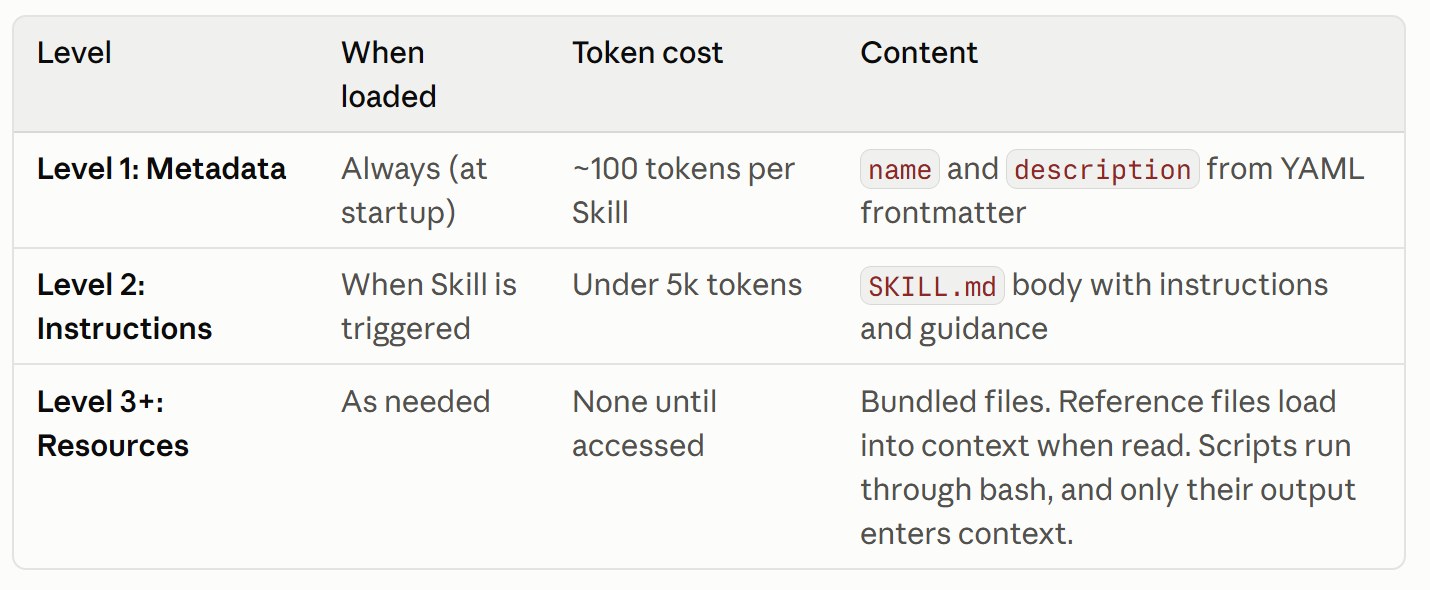
That means you can include a full example library for every channel without bloating every chat. A brand voice Skill might look like this:
northwind-voice/
├── SKILL.md            # core voice rules, when to use this skill
├── examples/
│   ├── linkedin.md     # 8 published posts we liked
│   ├── email.md        # 6 product emails
│   └── web.md          # landing page and pricing copy
├── rewrites.md         # bland draft → on-brand version, 12 pairs
├── claims.md           # approved numbers, product names, legal no-gos
└── scripts/
    └── check_draft.py  # flags banned phrases and long sentences
And the top of SKILL.md:
---
name: northwind-voice
description: Write and edit marketing copy in Northwind's brand voice. Use for any LinkedIn post, email, landing page, ad or blog draft for Northwind, and when asked to make copy sound "on brand".
---

# Northwind voice

Write like a senior engineer explaining something to a smart friend.
Short sentences. Concrete numbers. No hype.

Before writing, read the example file for the channel you are writing for.
After writing, run scripts/check_draft.py on the draft and fix anything it flags.
The script is the part a Project cannot do. A short Python file that flags banned words, sentence length or missing disclaimers runs the same way every time. Claude only sees what it flags, not the code itself.
Sharing it with a team: on Team and Enterprise plans, organization owners can provision Skills to everyone from organization settings, so the voice is available in every member’s Claude without anyone uploading files. In Claude Code, a Skill committed to the repository’s .claude/skills/ folder is available to anyone working in that repository.
Where it falls short:
- Claude decides when to use a Skill from its description. A vague description means it will not load when it should, so write it carefully and test it.
- It is still one person, one chat, one draft. There is no review queue, no publishing and no record of what went out.
Option 3: a custom content system
Projects and Skills make one writer faster. A content system replaces a workflow. It is the right shape when content goes out at volume, across several channels, or straight to a website.
A content system usually includes:
- A voice layer, built the same way as a good Skill: examples, rewrites, banned list, claims.
- Source data. Product docs, sales call notes, support tickets, search and AI visibility data, so drafts say something specific instead of something generic.
- Separate steps for separate jobs. One pass researches, one drafts, one edits for voice, one checks facts against your approved claims. Splitting the work catches more than asking one prompt to do everything.
- A human gate. Drafts land in a review queue, a Google Doc or a pull request. Nothing publishes without a person approving it.
- Publishing. Approved pieces go to your CMS, your social scheduler or, on a code-based site, straight into the repository.
- A feedback loop. Edits your team makes are saved and fed back as new rewrites, so the system gets closer to your voice over time.
The last point is what separates a system from a prompt. Every correction your editor makes becomes training material, instead of disappearing into a chat history.
Which one should you use?
| Project | Skill | Content system | |
|---|---|---|---|
| Setup time | An afternoon | A day or two, including testing | Weeks, scoped to your workflow |
| Works in | That Project in the Claude app | Claude apps, Claude Code and the API | Wherever it is built to run |
| Shared across a team | Yes, by sharing the Project | Yes, provisioned by an org owner | Yes, built in |
| Checks drafts automatically | No | Yes, with a bundled script | Yes, as its own step |
| Publishes content | No | No | Yes, after human approval |
| Learns from edits | Only if someone updates the files | Only if someone updates the files | Yes, by design |
| Best for | One team, one brand | Many people, one consistent voice | High volume or many channels |
A simple way to decide:
- Start with a Project if you are one team trying to get better first drafts this week.
- Move to a Skill once several people, or Claude Code, need the same voice, or you want drafts checked automatically.
- Build a system when the bottleneck is no longer drafting but everything around it: research, review, approvals and publishing.
Most teams we work with go through all three in that order. The voice file you write for the Project carries straight into the Skill, and the Skill becomes the voice layer of the system. None of the work is wasted.
Testing whether it actually sounds like you
Whichever setup you pick, test it before trusting it.
- Blind test it. Mix five real published pieces with five Claude drafts on similar topics. Ask someone on the team to pick out the AI ones. If they can do it easily, ask them how, and turn the answer into rules.
- Test the edges. Ask for a channel you rarely write for, a sensitive topic, or a product you have not launched. That is where voices break.
- Track your edits. For the first month, save every change your editor makes to a draft. The patterns tell you exactly what to add to the banned list and the rewrites.
The bottom line
Claude does not write in your voice because your voice was never written down in a form it can use. Fix that first, with real examples, a banned list and before-and-after rewrites. Then pick the setup that matches how much you publish: a Project for one team, a Skill for a whole organization, and a content system once volume and review become the real work.
If you want help turning your guidelines into a voice Claude can actually hold, our Content Systems practice starts with an audit of your best published work and the edits your team makes most often.