
Moving From Webflow to Claude Code: What Carries Over and What Doesn't
Webflow's code export leaves out your CMS, forms and search. Here is what actually moves when you rebuild a Webflow site as code that Claude Code edits, and how to do it without losing rankings.
Wyatt Johnson
November 2, 2026
In short
- 01 Webflow's code export gives you static HTML, CSS and images. CMS items, forms, site search, password protection and localized pages are not included.
- 02 Your CMS content comes out separately, as one CSV per Collection or through the Data API, and has to be rebuilt as files.
- 03 Webflow now has its own MCP server, so Claude can edit a Webflow site without leaving Webflow. For many teams that is the right first step.
- 04 Moving pays off when your team wants bulk edits, git review and automated publishing more than a visual canvas.
Webflow sold a lot of marketing teams on one idea: designers can ship pages without waiting on developers. For years that was the right trade. The question we hear now is different. If an AI agent can edit code on request, is a visual builder still the fastest way to change a website?
For some Webflow sites, the answer is yes, and you should stay. For others, a code-based build that Claude Code edits is faster, cheaper to run and easier to scale. This post covers what a move actually involves, the parts of Webflow that do not come with you, and how to tell which group you are in.
What “moving to Claude Code” means for a Webflow site
Claude Code is Anthropic’s coding agent. It reads and edits files, runs commands and works with git. It does not host anything. Moving a site “to Claude Code” means:
- The site is rebuilt in a framework such as Astro or Next.js.
- Each page and CMS item becomes a file in a git repository, usually Markdown or MDX.
- Your Webflow classes and symbols become reusable components.
- Changes are made by asking an agent, which edits the files, builds the site and opens a preview for a person to approve.
- A host like Vercel, Netlify or Cloudflare deploys the site whenever an approved change is merged.
We covered the general case in should you migrate from WordPress to Claude Code. Webflow is a different starting point, mostly because of what its export does and does not give you.
Webflow’s code export is not a migration
The first thing most teams try is the built-in export. On a paid Workspace plan, Webflow will zip up your site’s HTML, CSS, JavaScript and images. It looks like a finished site. It is not.
Per Webflow’s own code export help article, the export does not include:
- CMS content and functionality, including Collection items and Collection lists
- Form submission processing, existing submissions and reCAPTCHA
- Site search
- Site and page password protection
- User Accounts and Ecommerce
- Localized content beyond your primary locale
- Code components
In practice, every blog index, case study grid and resource library on an exported site shows its empty state. Collection template pages export as shells with no content in them. Forms stop sending. Search stops working.
The export is also all or nothing. Webflow says you cannot choose which parts to include.
There is a second problem that matters more if an agent will be maintaining the site. Exported Webflow markup is built for the Designer, not for people. Classes are prefixed with w-, layout depends on webflow.css and webflow.js, and a single page can be hundreds of nested divs. Claude can edit it, but every edit is harder to review than it should be. A clean rebuild is almost always the better foundation.
Getting your CMS content out
Your Collection items come out by one of two routes.
CSV export. From the Designer, you can export each CMS Collection to CSV. It works one Collection at a time, and multilingual sites need a separate pass per locale. Rich text fields come out as HTML inside the CSV, and image fields come out as URLs pointing at Webflow’s asset CDN. Both need converting before they are useful.
The Data API. For larger sites, a script that reads Collections through Webflow’s Data API is cleaner. Rate limits depend on your site plan: 60 requests per minute on Starter and Basic, 120 on the CMS-tier plans. That is plenty for a one-time migration script, as long as it backs off when it gets a 429.
Either way, the content then has to be turned into files:
- Map every Collection field to a frontmatter field or the body.
- Convert rich text from Webflow’s HTML into Markdown or MDX.
- Download every image off Webflow’s CDN and store it with the site. Do not leave live posts pointing at a CDN you are about to stop paying for.
- Rebuild reference and multi-reference fields as slugs, so an author page or a category page still links up.
This is the part of the move where Claude Code does the most work. Writing the conversion script, running it, and checking a few hundred generated files against the live pages is exactly the kind of repetitive job an agent handles well.
What you rebuild instead of carrying over
The things Webflow handled for you still need a home.
| Webflow feature | What replaces it on a code-based site |
|---|---|
| CMS Collections | Markdown or MDX files with a typed schema |
| Collection lists and templates | Framework content collections and page templates |
| Forms | A form service or a small serverless function that sends to your CRM |
| Site search | A static search index such as Pagefind, or a hosted search API |
| Interactions and animations | CSS transitions, or a small animation library for the few that matter |
| Password protection | Middleware at the host, or a proper login if it guards real content |
| 301 redirects | A redirect file at the host, such as vercel.json or _redirects |
| Editor for non-technical staff | Requests to an agent, with a preview link to approve |
That last row is the real decision. On Webflow, a marketer opens the Editor and types. On a code-based site, they ask an agent and approve a preview. Some teams find that faster. Some do not.
Cost is not the main reason to move
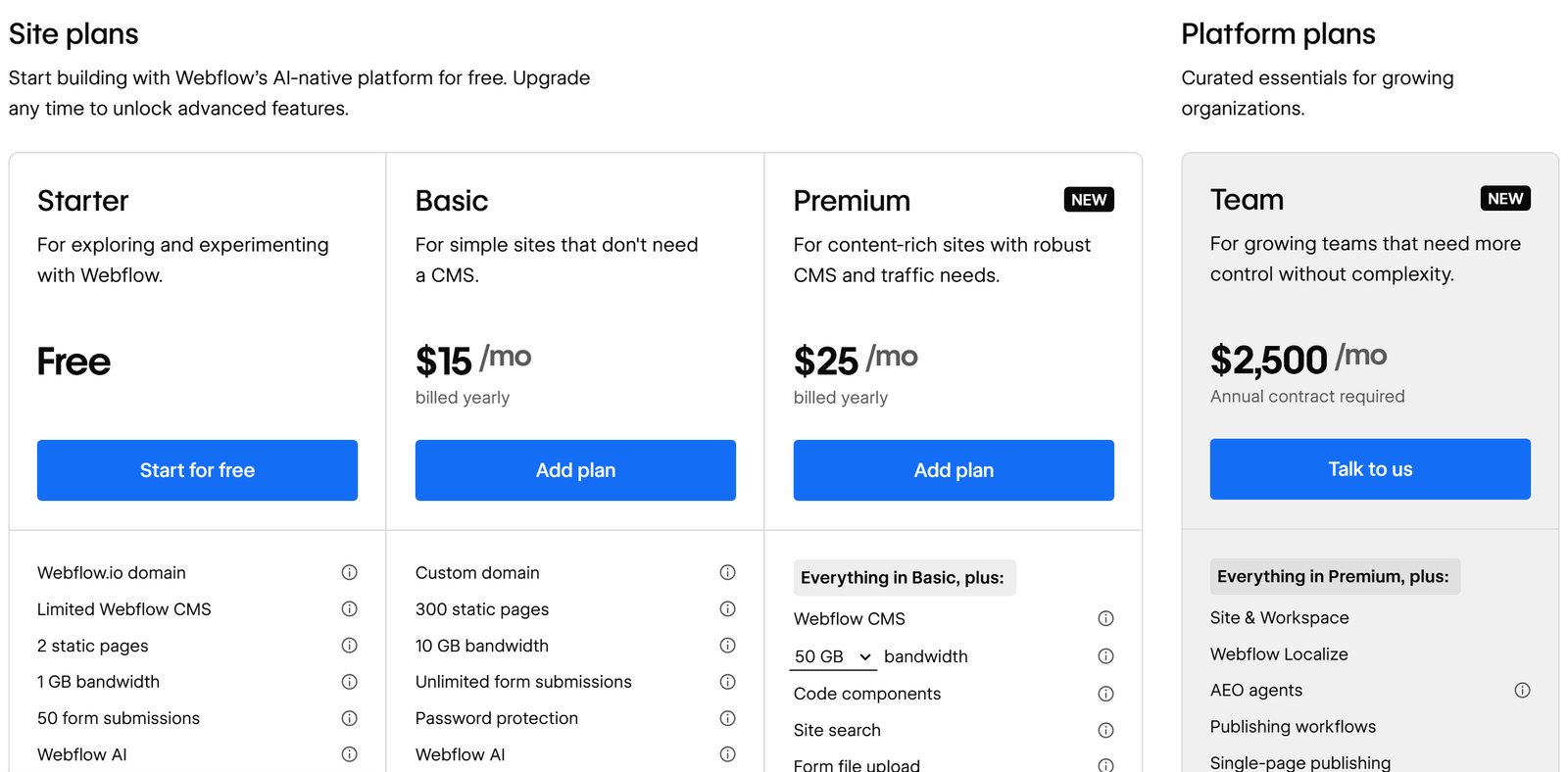
Webflow’s pricing page lists the Premium site plan, the one with the CMS, at $25 per month billed yearly. That is cheap. Hosting a static site on Vercel or Netlify can be free or close to it, but saving a few hundred dollars a year will not justify a rebuild on its own.
Two places where the cost does add up:
- Workflow features. Publishing workflows, single-page publishing and a site activity log sit in Webflow’s Team plan, listed at $2,500 per month on an annual contract. On a git-based site, branch previews, approvals and a full change history come with the repository.
- Seats and agency handoffs. Teams with many editors, or agencies running many client sites, pay for Workspace seats on top of site plans.
The better reasons to move are about speed and volume, not the hosting bill.
Before you move: Webflow has an MCP server now
It would be dishonest to skip this. Webflow ships an official MCP server, and its pricing page lists it on every site plan, including the free one. Connected to Claude, it can manage CMS Collections, edit elements and classes, build components and create GSAP-based Interactions. Webflow’s docs list a few limits: it cannot create new localized CMS items, it cannot touch Classic interactions, and visual snapshots and image uploads need the Designer open with Webflow’s bridge app connected. Page branches, Webflow’s closest thing to isolated changes, need an Enterprise plan.
For a team that loves the Designer and wants Claude to help with CMS updates, copy changes and page builds, that may be enough. It is a much smaller project than a migration, and it is where we would start for a lot of Webflow teams.
What the MCP server does not give you is the full git workflow on every plan: each change as a reviewable diff, a preview build per change, one-command rollbacks, and an agent that runs your build and catches its own mistakes before anyone sees them. It also keeps your site, your content and your history inside Webflow. Owning all of that in a repository is the main reason teams move.
When moving off Webflow pays off
A rebuild is usually worth it when most of these are true:
- You publish often. Blog posts, landing pages, comparison pages, location pages. The more you ship, the more an agent saves.
- You want bulk edits. Updating a product name across 300 pages, rewriting every meta description, adding FAQ blocks to every service page. On a file-based site, each of these is one request and one diff to review.
- You want automated publishing. An AI content system can open a pull request for each new article, so a person reviews it the same way they review any other change.
- Your CMS is your bottleneck. Teams that have restructured Collections to stay under plan limits, or bolted on third-party tools for search, filtering and forms, tend to come out ahead.
- Engineers are already in the loop. If developers handle your custom code embeds anyway, a repository is a better home for that work than an embed field.
When to stay on Webflow
Stay, or at least wait, if:
- Your designers live in the canvas. If visual layout is your team’s core skill and they are fast at it, taking it away costs more than it saves.
- Interactions are central to the brand. Heavy scroll animation and timeline Interactions take real effort to rebuild in code.
- You run Webflow Ecommerce or User Accounts. Those are separate rebuilds with payment and login systems to replace.
- Nobody will own the repository. Someone needs to approve changes and keep an eye on deploys. If that person does not exist, the Webflow Editor is safer.
- You localize heavily with Webflow Localize. It is doable to rebuild, but it is a bigger project with more URLs to protect.
How to move without losing rankings
The search risk in any migration is URLs changing without redirects and pages losing their metadata. The process that protects you:
- Crawl the live site. Export every URL, title, meta description, canonical, Open Graph image and status code.
- Pull search data. Use Search Console to list every page that earns clicks or impressions. Those URLs must survive or redirect. Our Search Console MCP guide shows how to let Claude pull that list for you.
- Keep URLs where you can. Webflow Collection URLs look like
/blog/post-slug. Most frameworks can match that exactly, which means no redirect at all. - Redirect everything else. Webflow’s 301 list lives in Site settings under Publishing. Copy it, then add a line for every URL you change.
- Carry over metadata and structured data. Titles, descriptions, alt text and any custom schema from your embeds.
- Check AI citations, not just rankings. Pages that AI assistants already cite are worth protecting even if they get little Google traffic. This is the work our GEO practice covers.
- Launch, then watch. Check crawl errors and impressions in Search Console for at least four weeks.
For the full step-by-step version, our guide to moving a website from WordPress to Claude Code applies almost unchanged once your Webflow content is out.
The bottom line
Webflow is still a good tool for teams who design visually and publish at a modest pace. Its export, though, was never meant to be an exit. Your CMS, forms and search stay behind, and the HTML that does come out is not a good base for an agent to maintain.
If your team wants to publish more, change things in bulk and review every edit in one place, a clean rebuild that Claude Code edits is the better long-term home. If you mostly want help with copy and CMS updates, connect Claude to Webflow’s MCP server first and see whether that covers it.