
How to Use MCPs for SEO (with Claude)
MCPs let Claude connect directly to your SEO data, search APIs, and website. Here's how to set them up and use them to run real SEO workflows.
Wyatt Johnson
May 22, 2026
In short
- 01 MCPs turn Claude from a language model into an active research tool that connects directly to your website data, search APIs, and crawling software.
- 02 The most useful MCPs for SEO cover web search, live page fetching, backlink data, Search Console integration, and browser automation.
- 03 The most interesting long-term use case is using Claude and MCPs together to track LLM visibility alongside traditional search performance.
Most AI-assisted SEO workflows involve a lot of copying and pasting. You pull data from Search Console, drop it into a chat window, get a response, paste that into a doc, then do it again with Ahrefs data. It works, but the context between steps gets lost and the analysis stays shallow.
MCPs change this. They give Claude direct access to external tools and data sources, so instead of pasting information into a conversation, you connect Claude to the sources themselves. The workflow becomes a single conversation with access to live data, not a series of manual transfers.
This guide covers what MCPs are, which ones matter most for SEO, how to connect them to Claude, and what you can actually do with them once they’re set up.
What is an MCP?
MCP stands for Model Context Protocol. It is an open standard that Anthropic introduced in November 2024 to give AI models a consistent way to connect to external data sources, APIs, and tools.
The core idea is simple. Without MCPs, Claude knows what was in its training data and what you paste into the conversation. With MCPs, Claude can query live systems. It can search the web, read a page, pull data from a database, run a browser, or connect to an API, all from inside the same conversation.
The MCP documentation describes it as a “universal, open standard for connecting AI assistants to the systems where data lives.” For SEO practitioners, that means Claude can work with the same data sources you already use, rather than requiring you to move everything through a chat interface manually.
Why this changes SEO analysis
Traditional SEO tooling is built around dashboards. You log into one platform for rankings, another for backlink data, another for technical audits, and a fourth for search performance. Each one gives you a slice of the picture. Connecting them requires manual effort.
Claude with MCPs can query multiple sources inside a single conversation and reason across all of them. Ask it to compare your top ten pages by traffic against their current citation rates in LLM outputs and it can pull that data, compare it, and tell you where the gaps are.
This matters because the analysis is often not the bottleneck in SEO. The bottleneck is the time it takes to move between tools, combine data, and write up recommendations. MCPs cut that time significantly.
The MCPs that matter most for SEO
Not every MCP is relevant for search work. The ones worth connecting are:
Brave Search MCP. Gives Claude access to live web search. Useful for SERP research, question mapping, competitor content analysis, and understanding what shows up for specific queries. Available from Anthropic’s official MCP servers repository.
Fetch MCP. Reads live web pages and returns their content. Useful for pulling metadata, reading page structure, checking headings and body copy, and analyzing on-page signals without leaving the conversation. Also in the official MCP servers repository.
Firecrawl MCP. A dedicated web crawling and scraping server. Better than the Fetch MCP for bulk URL analysis, full site crawls, and extracting structured data across many pages at once.
Ahrefs MCP. Ahrefs offers an MCP integration that connects Claude directly to your Ahrefs workspace. This gives Claude access to backlink profiles, keyword rankings, domain metrics, and site audit data without leaving the conversation.
Google Search Console MCP. Connects Claude directly to your GSC data. We built and open sourced our own version of this one. With it active, you can ask Claude to analyze your impression-to-click curves, identify queries where you rank but don’t convert, or flag pages that dropped in the last 30 days.
Puppeteer or Playwright MCP. Full browser automation. Useful for rendering JavaScript-heavy pages, testing how a site looks to a crawler, checking Core Web Vitals in context, and mimicking how AI systems access your content.
SQLite or Postgres MCP. For storing and querying analysis across sessions. Useful if you want Claude to maintain an ongoing record of ranking movements, citation rates, or audit findings over time.
| MCP | Primary use for SEO | Where to get it |
|---|---|---|
| Brave Search | SERP research, question mapping, competitor discovery | Official MCP servers repo |
| Fetch | On-page analysis, metadata, content structure | Official MCP servers repo |
| Firecrawl | Site crawls, bulk URL analysis, structured data extraction | Firecrawl’s MCP server |
| Ahrefs | Backlinks, rankings, domain metrics, site audits | Ahrefs MCP integration |
| Google Search Console | Impressions, clicks, CTR, position tracking | Our open source MCP server |
| Puppeteer / Playwright | JavaScript rendering, browser-level crawling | Official MCP servers repo |
| SQLite / Postgres | Storing analysis, tracking changes over time | Official MCP servers repo |
How to connect MCPs to Claude
The most accessible way to use MCPs is through Claude Desktop, which is available on macOS and Windows.
The easiest method is through the built-in Connectors panel. Click Customize in the top-left corner of Claude Desktop, then select Connectors. From there you can browse available integrations and connect them directly without editing any configuration files.
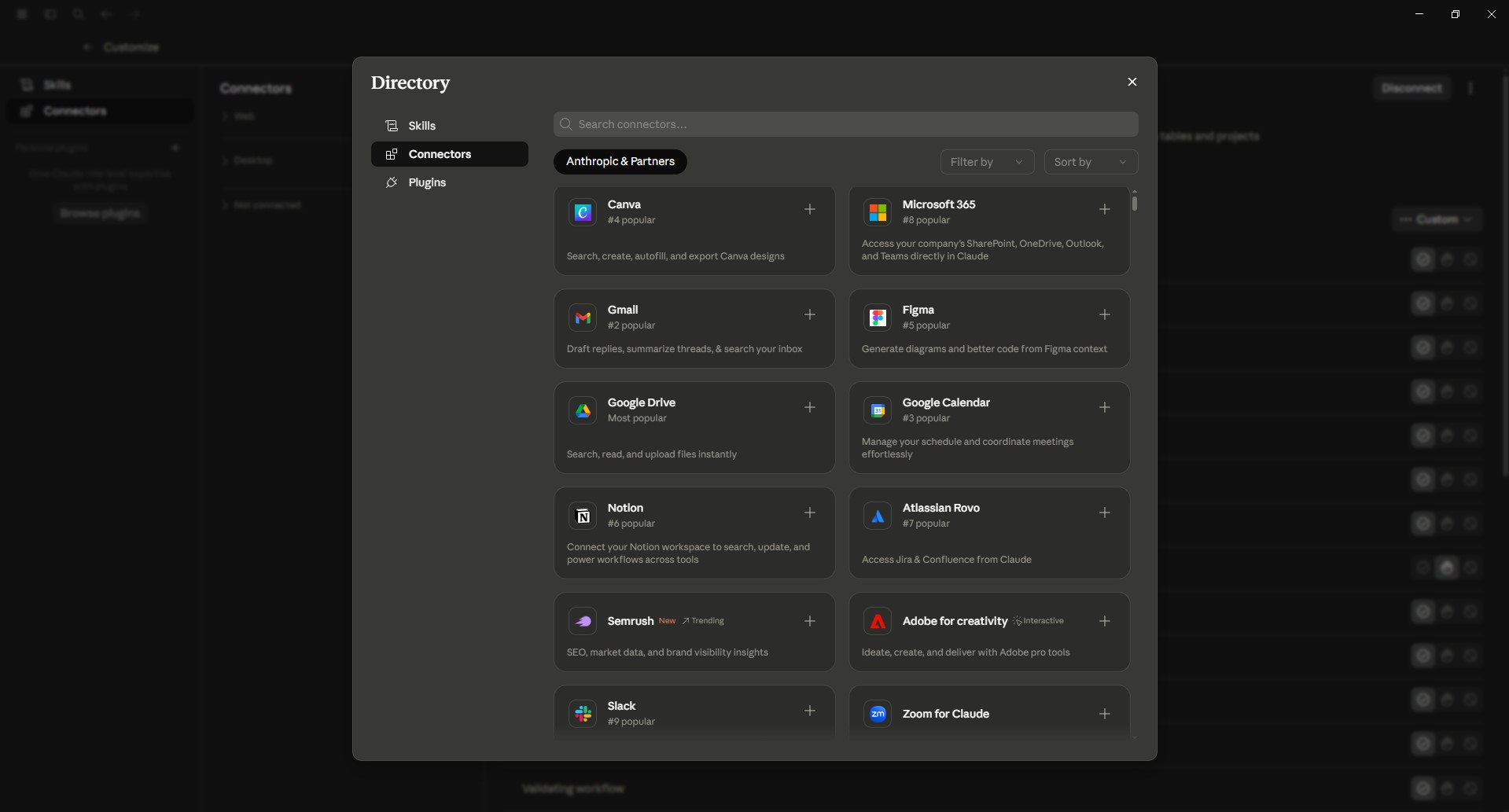
For MCPs not listed in the Connectors panel, Claude Desktop also supports connections through a configuration file called claude_desktop_config.json, stored locally on your machine. The general setup for those works like this:
- Find or install the MCP server you want to use. Many are available as npm packages or Python packages.
- Add the server’s configuration to your
claude_desktop_config.jsonfile, including the command to start it and any required credentials or API keys. - Restart Claude Desktop and the MCP connections will appear in new conversations.
For example, connecting the Brave Search MCP requires a Brave Search API key. Once configured, Claude will have access to live search results whenever you ask it to look something up. The MCP quickstart guide walks through the exact steps for setting this up.
Claude Code, the command-line interface, also supports MCPs and is useful if you want to run SEO analysis alongside code workflows or automate parts of the process.
Practical SEO workflows with Claude and MCPs
Once MCPs are connected, the workflows that become practical are meaningfully different from what you can do in a standard chat window.
SERP research and content mapping. With Brave Search connected, you can ask Claude to search for a target keyword, summarize the intent behind the top results, identify what content formats are ranking, and flag the questions that show up in People Also Ask. Claude can then compare that against your existing content and tell you where the gaps are. What would take thirty minutes of tab-switching takes a few minutes of conversation.
On-page technical audits. With the Fetch MCP, you can give Claude a list of URLs and ask it to pull each one, check for missing title tags, duplicate meta descriptions, heading hierarchy issues, missing schema markup, and page copy that does not match the target intent. Claude can work through a list of pages systematically and output a structured audit without you opening a single page in a browser.
Backlink and competitor analysis. With Ahrefs connected, you can ask Claude to compare your backlink profile against a specific competitor, identify linking domains they have that you do not, and surface the content types that earned their strongest links. The value is not that Claude does something Ahrefs cannot. It is that Claude can interpret the data, apply judgment, and help you prioritize what to do next.
Search Console analysis. With GSC data accessible, you can ask Claude to find queries where you have high impressions but low CTR, identify pages that are ranking in positions 5 through 15 and have strong click potential, or flag queries where you used to rank that you no longer appear for. These are questions you can answer manually in GSC, but Claude can answer them faster and at higher volume.
Content gap analysis. Combining Brave Search and Fetch, you can ask Claude to identify the topics your competitors cover that you do not, then analyze the pages covering those topics and produce a brief for each one. This condenses a process that typically involves multiple tools and multiple team members.
The GEO connection
The most interesting long-term use case for Claude and MCPs in search is not replacing existing SEO tools. It is closing the gap between traditional search visibility and LLM visibility.
The brands that are ahead right now are tracking two things in parallel: where they rank in Google, and where they appear in AI-generated answers from ChatGPT, Perplexity, Claude, Gemini, and AI Overviews. Those two pictures do not always align. You can rank well for a keyword and still be absent or misrepresented in AI answers.
With a Brave Search MCP or a Perplexity MCP connected, you can ask Claude to run your core buyer prompts through live AI search and compare the results against your own ranking data. Where do competitors appear in AI answers that they do not appear in organic rankings? Which of your pages earn citations and which are being ignored? What third-party sources are AI tools pulling from in your category?
That is a GEO audit running inside a Claude conversation. It is the same analysis we run for clients, made faster and more repeatable with the right MCP connections in place.
If you want to understand how your brand currently appears in AI answers and what sources shape those answers, that is where we spend most of our time. Reach out and we can walk through it.
What to watch for
A few practical notes for anyone setting this up.
Data freshness matters. MCPs that connect to live sources (Brave Search, Fetch, GSC) are only as useful as the data they return. If you are doing time-sensitive competitive research, live search is valuable. If you are doing content strategy planning, a crawl from last week is probably fine.
Context window limits apply. If you ask Claude to pull and analyze a hundred URLs at once, you will run into context limits. Build workflows that chunk analysis into manageable batches rather than trying to do everything in one prompt.
Credentials need to be handled carefully. MCPs that connect to Ahrefs, Search Console, or other tools require API keys or OAuth credentials. Follow the setup documentation carefully and do not share your claude_desktop_config.json with credentials included.
Verification still matters. Claude will reason over what it gets from MCP sources. If an MCP returns incomplete or unusual data, the analysis will reflect that. Review outputs before acting on them, especially for anything that feeds into a client report or a publishing decision.
The bigger picture
MCPs are still being adopted. Most SEO practitioners are not using them yet, which means the practitioners who set them up now are doing work in minutes that will still take competitors hours for the next year or two.
The cleaner workflows are worth it on their own. Faster audits, faster research, fewer tab-switching sessions. But the more important reason to pay attention to MCPs is the same reason to pay attention to how AI tools see your content at all: the research stack is shifting, and the brands that adapt their workflows first will have better data to work from.
If you want to talk through how to build LLM visibility tracking alongside your existing SEO program, get in touch with Viewership. We can help you identify the right data sources, prompts, and workflows for your category.